

Samsung is introducing a much stricter lock screen security policy with its latest One UI 9 that ships out of the box with the latest Galaxy Z Fold 8, Z Fold 8 Ultra and Z Flip 8.
If you enter the wrong PIN, password or pattern 13 times, your device will be permanently locked and the only way to use it again is to perform a factory reset. This would erase all data stored on the device.
According to Samsung, the new security policy applies to Galaxy devices that ship with One UI 9 out of the box. The new policy is intended to improved protection against brute-force attacks, where an attacker repeatedly guesses a PIN or password to gain unauthorised access to a lost or stolen device.
One UI 9 introduces escalating lockout periods
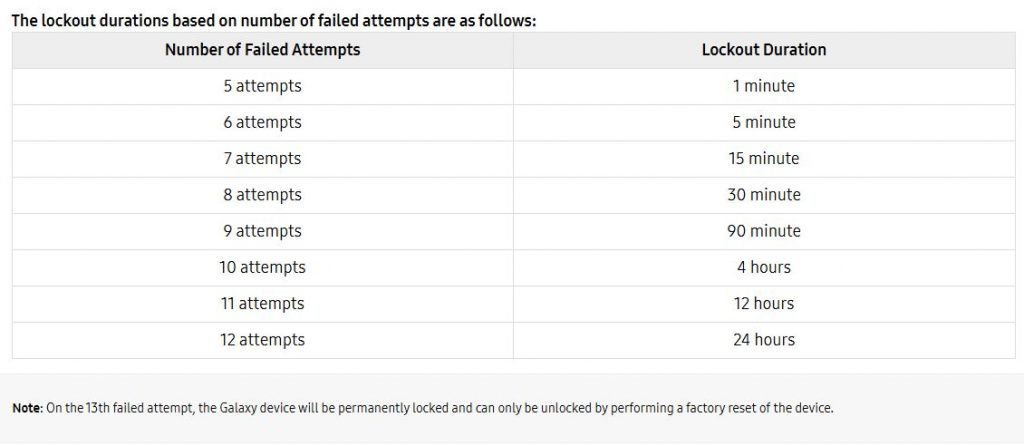
Instead of allowing unlimited tries, One UI 9 introduces progressively longer waiting periods after repeated failed unlock attempts. After 5 failed attempts, the device will be locked out for 1 minute.
After the 6th failed attempt, the lockout duration increases to 5 minutes, 15 minutes, 30 minutes, and 90 minutes, before it extends to hours after the 9th attempt.
On the 12th failed attempt, the lockout duration is 24 hours and this would be your last chance to access your device with your data intact. As noted above, your Galaxy device will be permanently locked and can only be restored via a factory reset of the device on the 13th failed attempt.
Samsung says these escalating delays are designed to make brute-force hacking attacks significantly more difficult while still giving device owners multiple opportunities to remember the correct lock screen credentials. There will be message displayed to let you know the exact number of remaining attempts left.
Don’t forget your PIN, even if you use fingerprint or face unlock
If you normally unlock your Galaxy phone using your fingerprint or face, Samsung says it’s still important to remember your backup PIN, password or pattern.
According to Samsung, users are required to authenticate using their backup PIN, Pattern or Password at least once every 72 hours, even if biometric authentication is enabled. Samsung also mentions that for security reasons, Samsung cannot remotely view, retrieve or recover your local lock screen PIN, Pattern of Password.
If you exceed the maximum number of failed attempts or can no longer remember your lock screen credentials, the only recovery method is to perform a factory reset. After the reset, you are still required to verify the Samsung Account and Google Account previously registered on the device to clear the Factory Reset Protection (FRP) lock.
Back up your data regularly
The new policy makes Galaxy devices much harder to access through repeated guessing attempts, which is an improved security improvement if your phone gets lost or stolen. However, that also means that users need to be extra careful not to forget their lock screen credentials.
To avoid losing data including your messages, photos and videos, it is recommended to perform regular backups using Samsung Cloud, Google Photos and other cloud-based solutions. If your device gets lost or stolen, you can restore your data or files from the cloud.
Samsung’s stringent security policy on One UI 9 is somewhat similar to iOS’ implementation for the iPhone. iOS also imposes extended lockout periods after repeated incorrect passcode. After 10 failed passcode attempts, the iPhone will enter into a permanent security lockout state where the only way to restore your device is by erasing your phone’s data.
If you want to take your iPhone security further, there’s an option under the Face ID & Passcode settings where you can set the device to automatically Erase all data on your iPhone after 10 failed passcode attempts.
[ SOURCE ]